

OpenVPN as Windows Service
Help
Run OpenVPN as Windows service for auto-connect at boot. Install openvpn.exe, configure interactive service, set startup type.
Auto-start OpenVPN via the Windows Services manager:
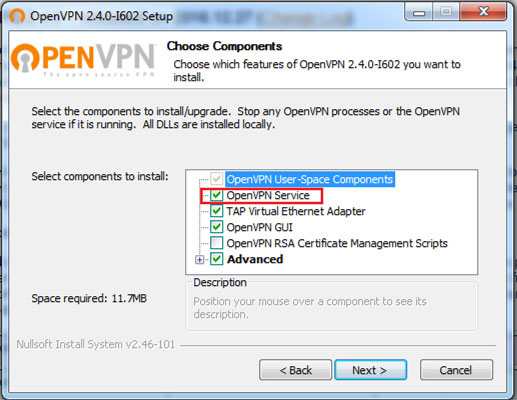
1. Install OpenVPN. During setup, make sure to check the OpenVPN Service option.
2. Configuration files MUST be placed in C:\Program Files (x86)\OpenVPN\config or C:\Program Files\OpenVPN\config on 64-bit Windows.
3. Open Control Panel → Administrative Tools → Services.
4. Open the OpenVPNService properties and set the startup type to "Automatic".
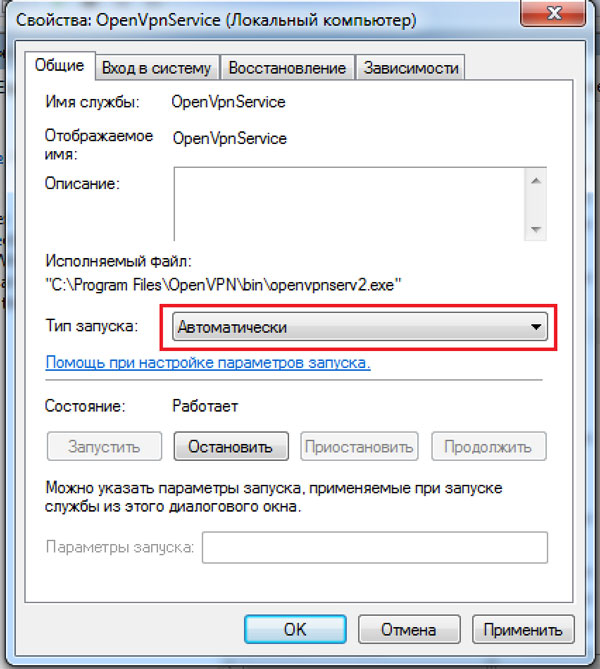
5. Start the service. If everything is set up correctly, a new network connection with the TAP-Win32 Adapter V9 will appear. You can verify in Control Panel → Network and Sharing Center.
6. After a reboot, the service will start and connect automatically.